


Download Saturn – Free Astronomical Guide for Windows, macOS, Android & iOS
Overview
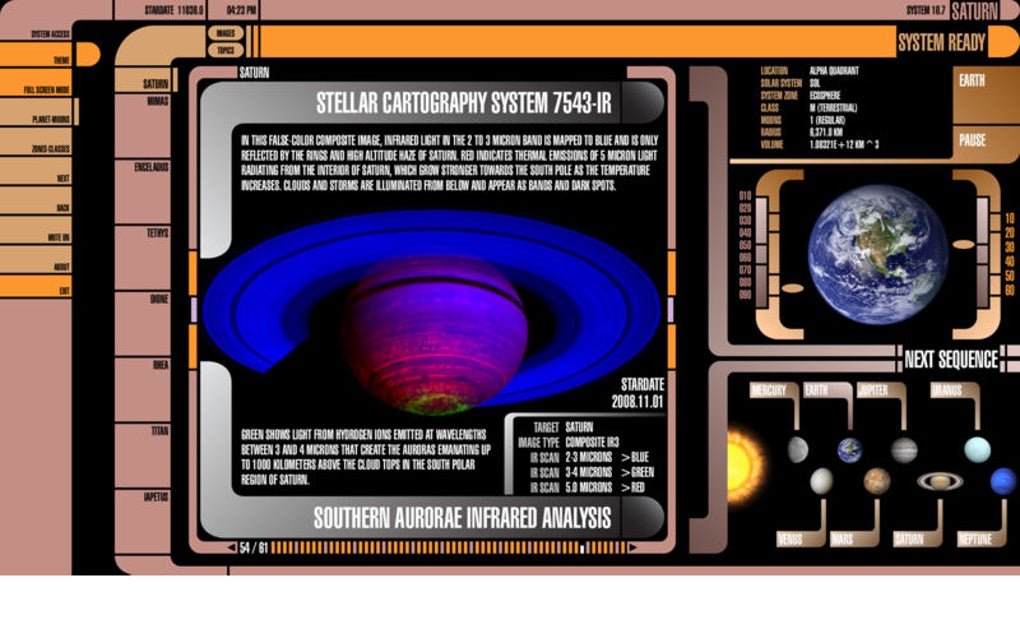
Saturn is a dedicated astronomy app that brings the majestic ringed planet straight to your handheld or desktop device. Designed for both casual sky‑watchers and serious hobbyists, the app packs more than 500 high‑resolution images of Saturn, its spectacular rings, and over 80 of its moons. In addition to stunning visuals, Saturn offers a library of expertly written articles covering the planet’s physical characteristics, orbital dynamics, historical observations, and even its portrayal in popular culture such as the Star Trek franchise.
The user‑friendly interface lets you browse content by categories like “Ring Structure,” “Moons & Titan,” “Mission History,” and “Fiction & Media.” Every article is enriched with interactive diagrams, timelines, and citation links to scientific journals, ensuring that the information is both engaging and reliable. Whether you’re preparing for a night of telescope viewing, researching for a school project, or simply curious about the wonders of our solar system, Saturn provides a comprehensive, portable resource that can be accessed offline after the initial download. The app is regularly updated with the latest findings from missions like Cassini‑Huygens, guaranteeing that you stay current with the most recent discoveries about this iconic planet.
Key Features & Installation Guide
- 500+ high‑definition images of Saturn, its rings, and moons.
- 150+ articles written by professional astronomers and educators.
- Interactive 3D model of Saturn’s ring system.
- Mission timeline from Pioneer 11 to Cassini‑Huygens.
- Special section on Saturn in science‑fiction, focusing on Star Trek.
- Offline mode – all content available without internet after first sync.
- Regular free updates with new imagery and research findings.
- Multi‑language support (English, Spanish, French, German).
Step‑by‑Step Installation
- Visit the official download page or your device’s app store (Google Play, Apple App Store, Microsoft Store, or Mac App Store).
- Click “Download” or “Get” and wait for the installer to finish downloading.
- On Windows, run the .exe file; on macOS, drag the Saturn app into the Applications folder.
- For Android, tap “Install” and grant storage permissions; for iOS, tap “Install” and allow location access if you wish to use the sky‑map feature.
- Launch the app. The first launch will prompt you to download the core content pack (≈200 MB). Choose “Download now” to enable offline access.
- Sign in with a free account to sync your preferences across devices and receive update notifications.
Compatibility
Saturn runs on Windows 10 or later, macOS 10.14 (Mojave) or later, Android 8.0+, and iOS 13+. The app is optimized for both tablets and smartphones, and a desktop version is available for larger screens, ensuring a smooth experience whether you’re on a laptop, a 12‑inch iPad, or a 6‑inch Android phone.
Pros, Cons & Frequently Asked Questions
Pros
- Extensive visual library: Over 500 curated images provide a breathtaking look at Saturn’s features.
- Scientifically accurate: Content reviewed by astronomers and linked to peer‑reviewed papers.
- Offline capability: All resources are available without an internet connection after the first download.
- Regular free updates: New mission data and images are added automatically.
- Cross‑platform support: Seamless experience across Windows, macOS, Android, and iOS.
Cons
- Initial download size (~200 MB) may be large for limited mobile data plans.
- No built‑in telescope control integration (requires third‑party apps for live tracking).
- While the app is free, a premium “Pro” tier unlocks advanced 3‑D simulations for a modest yearly fee.
FAQ
Is Saturn completely free to use?
Yes, the core content—including all images and articles—is free. A optional Pro subscription adds enhanced 3‑D simulations and priority support.
Can I access Saturn offline?
After the initial content pack download, the entire app works offline, making it ideal for field trips or remote observing sessions.
Does the app receive regular updates?
The development team releases free updates every 2–3 months, incorporating the latest scientific findings and additional imagery from ongoing missions.
Is there a way to sync my notes across devices?
Yes, creating a free Saturn account enables cloud sync of bookmarks, personal notes, and reading progress across all supported platforms.
How does Saturn handle privacy and data security?
The app follows GDPR‑compliant practices, stores user data on encrypted servers, and does not share personal information with third parties.
Conclusion – Why You Should Download Saturn Today
Saturn stands out as a niche yet powerful educational tool that delivers a museum‑level experience of the ringed planet right to your pocket. Its blend of high‑quality imagery, rigorously researched articles, and seamless cross‑platform functionality makes it an indispensable companion for anyone interested in planetary science. The offline mode ensures that you can explore Saturn’s wonders even under a starry night far from Wi‑Fi, while the regular free updates guarantee that the knowledge you gain stays current.
Although the initial download size and the absence of built‑in telescope control may be minor drawbacks, they are far outweighed by the app’s depth, accuracy, and the sheer joy of navigating a virtual Saturn in vivid detail. Whether you’re a student preparing a presentation, an amateur astronomer planning a night of observation, or a sci‑fi fan curious about Saturn’s role in pop culture, this app offers something for every curiosity. Click the download button now, install Saturn on your preferred device, and embark on a journey through one of the most iconic worlds in our solar system—securely, for free, and with confidence that you’re using a tool built by experts for enthusiasts.
Overall Rating: 4.6 / 5







